A résumé says one thing.
The screen hears another.
The client gets a few notes.
AI-assisted recruiter screening
Guide the screening conversation, capture what candidates actually said, and approve what goes to your client.
What Veyrag does
A résumé says one thing.
The screen hears another.
The client gets a few notes.
Veyrag sits beside the recruiter. It prepares the screen from the role, keeps what the candidate actually said, and turns it into a submission you approve, so the client gets what the screen really showed.
How it works
You lead every step. Veyrag never sends anything to a client.
Add the role, the job description and the résumé. Veyrag plans what a 10, 15 or 20-minute screen can cover.
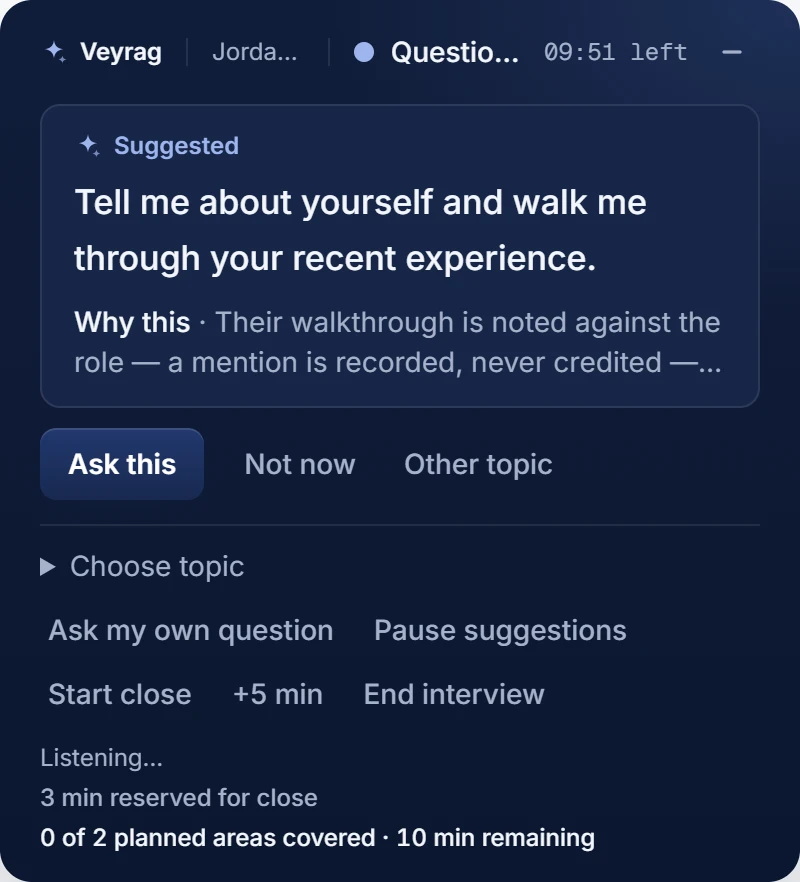
Your microphone and the meeting tab's audio, in Chrome. When a useful next question is ready, it's suggested: ask it, ask your own, or move on. Already had the call? Import the Zoom, Teams or Meet transcript.
A Candidate Brief built on the candidate's own words. Mark anything overstated or in the wrong area.
Client-ready wording grounded in the screen. You write the recommendation and approve every version.
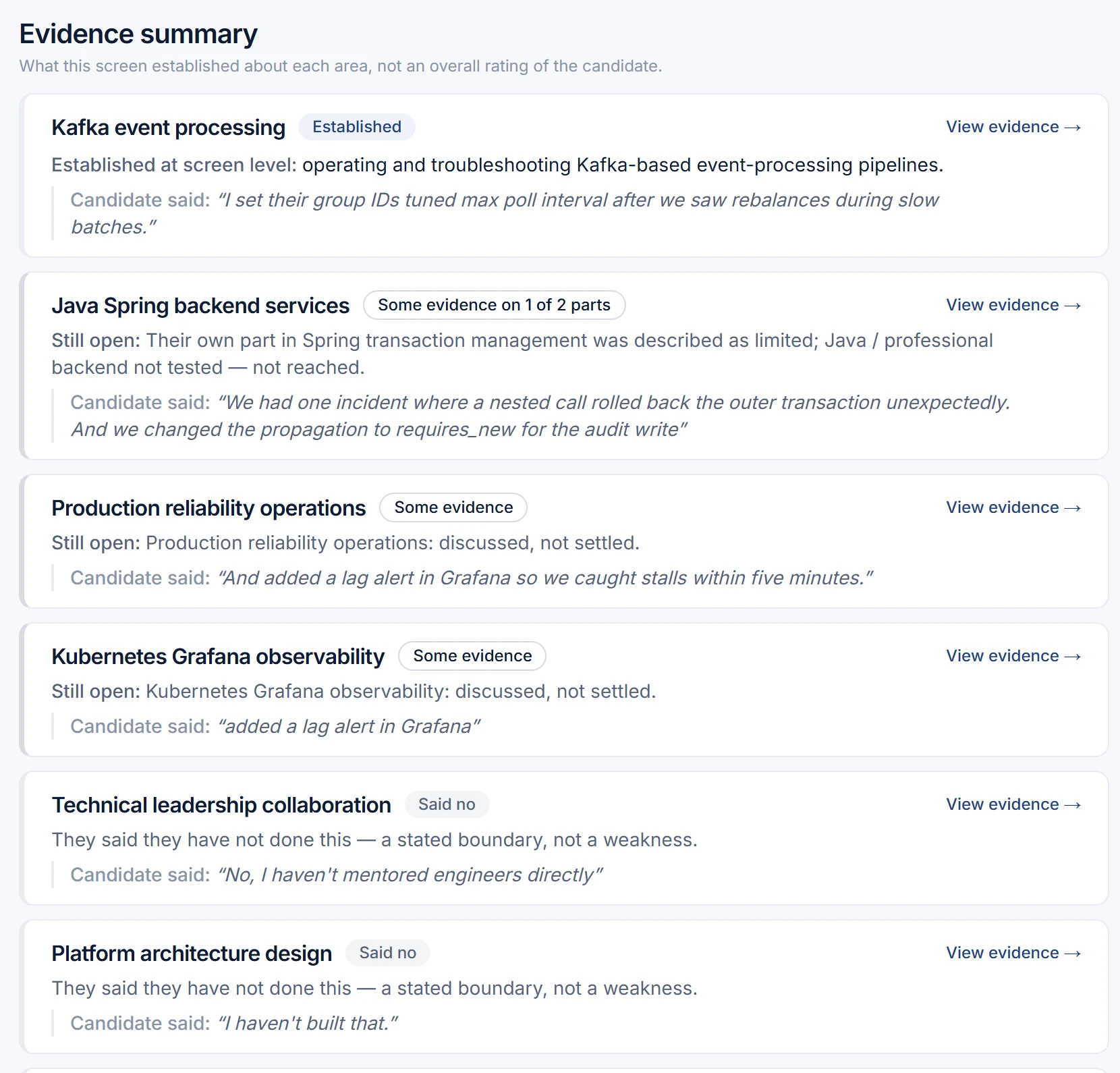
The Candidate Brief
What the screen established, what the candidate said they haven't done, and what wasn't tested are kept apart. Evidence states, never scores.
Was Veyrag right? Correct, Overstated, Wrong area or Needs context. Your review stays with the record; the evidence itself is never rewritten.
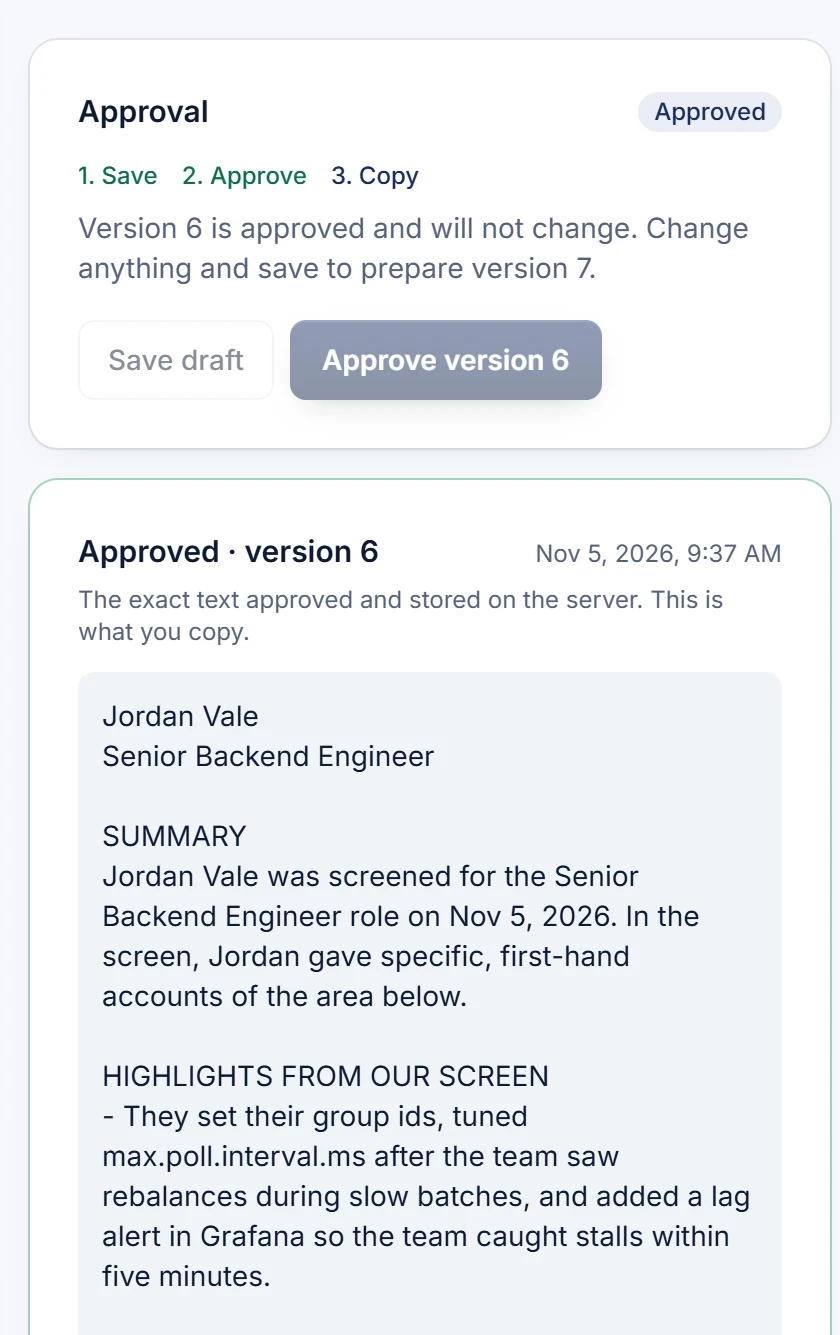
The client submission
Each strength rests on something the candidate actually said. Veyrag suggests the wording; you choose it, write the recommendation yourself, and approve a version.
Audio recording import is in testing and is not yet available. Technical Interview is coming soon. Veyrag organizes evidence from the conversation; it does not verify a candidate's abilities or make hiring decisions.

Why staffing agencies use Veyrag
Every strength is the candidate's own words, taken from the conversation itself.
What wasn't reached is listed as not tested, and what the candidate said they haven't done is their own statement. Never a weakness, never a guess.
You lead the call, correct the readings and approve every version. No AI bot joins the call.
Copy the approved text where it belongs. Veyrag isn't trying to replace it.
A recruiter-screening copilot. It prepares a recruiter screen from the résumé and job description, supports the screen live or imports its transcript, organizes your notes and the candidate's essentials, and drafts a client submission grounded in what the candidate said, for you to review and approve.
Recruiters and staffing agencies who screen candidates for technical roles and submit them to clients or hiring managers. During early access, accounts are for agencies operating in the United States, screening candidates based in the United States, signing up with a work email.
For a live screen, Veyrag uses your microphone for your side and the audio of the browser tab your meeting runs in (Zoom, Teams or Meet in the browser) for the candidate's side, in Chrome on a desktop. No bot joins the call. If the meeting runs in a desktop app, import its transcript afterwards instead.
Yes. Upload a transcript export (.vtt, .srt or .txt) or paste it, with each line starting with who spoke. You confirm which speaker is the recruiter and which is the candidate, correct any line, record the call's date, and finish the import. One import uses one free screen.
Not yet. Importing an audio recording is in testing and is not available in the product today. Until it is, import the recording's transcript.
No. Veyrag organizes what the screen established at screen level: what the candidate described, what they said they haven't done, and what wasn't tested. It does not verify technical ability, score candidates or make hiring decisions. You review every reading and approve anything that goes to a client.
Each account gets 10 free recruiter screens, with no credit card and no expiry. A free screen is one live Recruiter Screen of 10, 15 or 20 minutes, or one imported transcript.
Screening records stay under your account and are deleted 30 days after the candidate's recorded consent, or earlier when you delete them. Veyrag does not keep call audio; audio and text are processed by OpenAI for transcription and analysis under its API data policy. The details are in the Privacy Notice and the Data Processing Terms.

No credit card required. Import a screen you already ran, or run your next one with Veyrag.